Saturday, 7 May 2016

Master Boot Record

A device is "Bootable" if it carries a boot sector with the byte sequence 0x55, 0xAA in bytes 511 and 512 respectively. When the BIOS finds such a boot sector, it is loaded into memory at a specific location; this is usually 0x0000:0x7c00 (segment 0, address 0x7c00). However, some BIOS' load to 0x7c0:0x0000 (segment 0x07c0, offset 0), which resolves to the same physical address, but can be surprising.

When the wrong CS:IP pair is assumed, absolute near jumps will not work properly, and any code like mov ax,cs; mov ds,ax will result in unexpected variable locations. A good practice is to enforce CS:IP at the very start of your boot sector.


On a hard drive, the so-called Master Boot Record (MBR) holds executable code at offset 
0x0000 - 0x01bd, followed by table entries for the four primary partitions, using sixteen bytes per entry (0x01be - 0x01fd), and the two-byte signature (0x01fe - 0x01ff).  

Booting Process

When a computer  starts up ( obviously by pressing the power button), the first thing that occurs is it  send a signal to motherboard which in turn starts the power supply. After supplying the correct amount of power to each device, it send a signal called "Power OK" to BIOS which resides on motherboard.


Booting Process
BOOTING PROCESS


Once the BIOS receive the "Power OK" signal, it starts the booting process by first initializing a process called POST (Power On Self Test). POST first check that every device has right amount of power and then it check whether the memory is not corrupted. Then it initialize each devices and finally it gives control to BIOS for further booting.

Now the final process of booting begins. For this the BIOS first find 512 bytes of image called MBR (Master Boot Record) or Bootsector from the floppy disk or hard disk which is used for booting. The priority of boot devices is set by the user in BIOS setting. The normal priority is floppy disk first, then hard disk.

Once BIOS finds the bootsector it loads the image in memory and execute it. If a valid bootsector is not found, BIOS check for next drive in boot sequence until it find valid bootsector. If BIOS fails to get valid bootsector, generally it stops the execution and gives an error message "Disk boot failure".

It is bootsectors responsibility to load the operating system in memory and execute it.

Operating System - Introduction

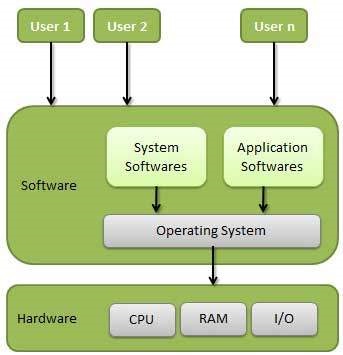
An operating System (OS) is an intermediary between users and computer hardware. It provides users an environment in which a user can execute programs conveniently and efficiently.

In technical terms, It is a software which manages hardware. An operating System controls the allocation of resources and services such as memory, processors, devices and information.

Definition:

An operating system is a program that acts as an interface between the user and the computer hardware and controls the execution of all kinds of programs.


Following are some of important functions of an operating System.
  • Memory Management
  • Processor Management
  • Device Management
  • File Management
  • Security